
How to Check Your Florida Contractor License Status: A 2026 Guide

Imagine standing at the building department ready to pull a permit for your biggest project of 2026, only to be told your license is no longer valid. Learning how to check my Florida contractor license status is the first step in protecting your livelihood and avoiding this professional nightmare. For many contractors, the realization that their standing has lapsed happens at the worst possible moment, often stalling projects and damaging client trust.
We understand that navigating the Florida Department of Business and Professional Regulation (DBPR) website feels like a chore you’d rather avoid. It’s frustrating to search through layers of government menus when you just want a simple answer. You shouldn’t have to be a tech expert to verify your own hard-earned credentials or check on your CE reporting progress. We are here to simplify that process for you.
This guide shows you exactly how to navigate the DBPR portal without the usual headache. You’ll learn how to interpret your results and, more importantly, what to do if you find yourself facing a “Delinquent” or “Inactive” status before the August 31, 2026, renewal deadline. We’ll break down the steps to verify your credentials, clarify the 14-hour CE requirements, and provide a clear path to keeping your status “Current, Active.”
Key Takeaways
- Learn the fastest way to navigate the DBPR portal by using your license number for instant, accurate verification.
- Discover the critical differences between “Active” and “Inactive” statuses and how they impact your legal ability to pull permits.
- Master how to check my Florida contractor license status to identify reporting errors or missing credits before they lead to fines.
- Understand the 14-hour continuing education breakdown required for the upcoming August 31, 2026, renewal deadline.
- Find out why automatic reporting of your CE hours is the most reliable method to maintain a compliant standing with the state.
Understanding the DBPR Portal: Where to Start Your Search
The Florida Department of Business and Professional Regulation (DBPR) is the state’s primary agency for professional oversight. It manages everything from real estate to construction licensing. The DBPR portal serves as the central repository for all professional license data in the state of Florida. Knowing how to check my Florida contractor license status through this portal is a vital skill for any trade professional. It ensures you remain compliant with state laws and ready for new opportunities.
The Construction Industry Licensing Board (CILB) works within the DBPR to regulate the building trades. They set the standards for entry and handle disciplinary matters. Regular status checks are essential because local building departments verify your standing before approving any permit. If your status isn’t “Active,” you won’t get the permit. Similarly, general contractors and clients often verify your credentials before signing a contract or awarding a bid. A quick check today prevents a major headache tomorrow.
The Importance of the CILB and ECLB
Florida uses separate boards to manage different trade categories. The CILB oversees general, building, and residential contractors, while the Electrical Contractors’ Licensing Board (ECLB) handles specialized electrical and alarm work. Each board has unique renewal dates and continuing education requirements. When you look into how to check my Florida contractor license status, your results will indicate which board governs your license. Using your specific license number is the most accurate way to search. It bypasses any confusion between similar business names or different trade categories.
Gathering Your Information Before Searching
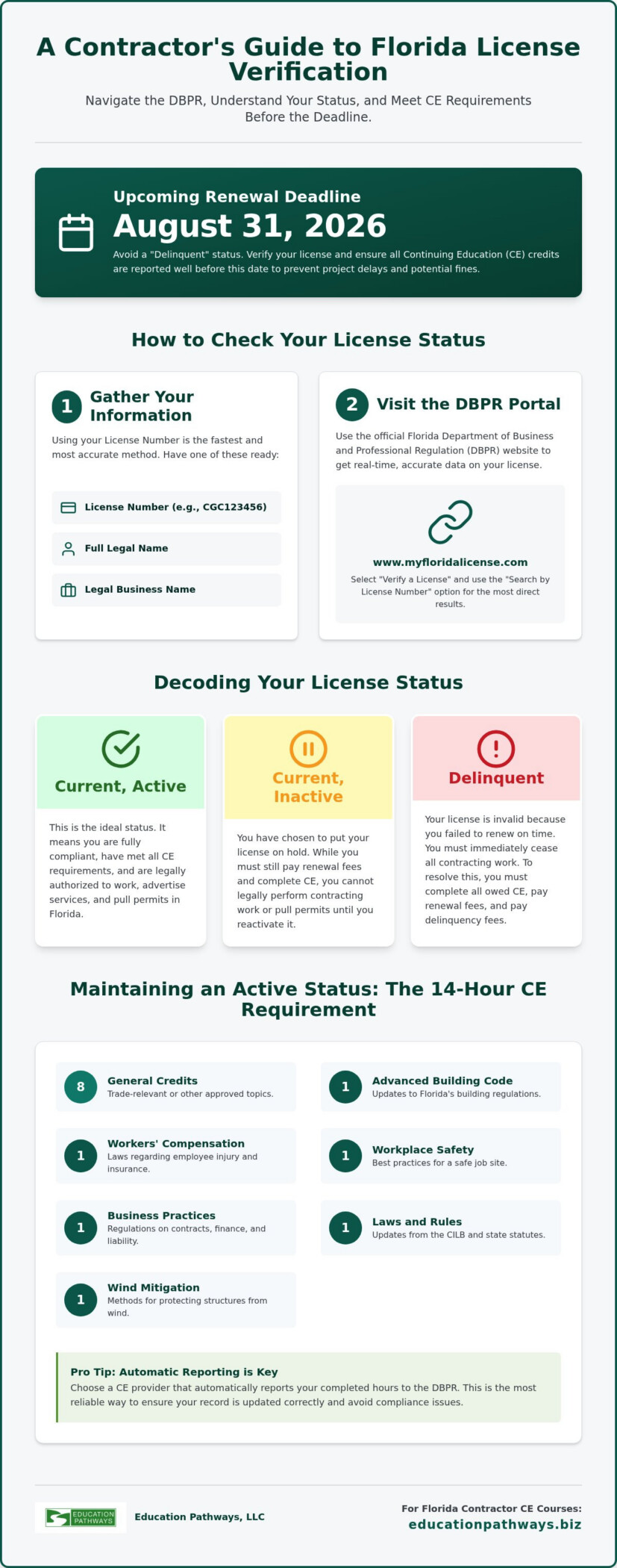
Before you log in, gather the correct details to ensure a smooth search. You can look up a license using several methods:
- License Number: This is the fastest way to get an exact match.
- Full Legal Name: Use the name exactly as it appears on your government ID.
- Business Name: Use the legal entity name registered with the state.
A common pitfall involves using “Doing Business As” (DBA) names. The DBPR system often prioritizes the primary legal entity. If your search fails, check your previous renewal paperwork for the exact name on file. If you find your status is “Delinquent” due to missing credits, you can quickly address it through Florida Contractor Continuing Education courses. Preparing these records beforehand makes your verification session efficient and stress-free.
Step-by-Step Guide to Verifying Your Florida License Status
To begin, visit the DBPR’s online license verification portal. This tool is the definitive source for real-time data. It is updated daily to reflect new renewals, reported credits, and disciplinary actions. Mastering how to check my Florida contractor license status starts with selecting the right search criteria from the main dashboard menu.
Select “Search by License Number” for the most efficient results. This method is the fastest way to pull your specific file without scrolling through hundreds of similar business names. You’ll need your license prefix, such as CGC for General Contractor or CCC for Roofing, followed by the numerical string. Ensure there are no spaces between the prefix and the numbers to avoid search errors. Reviewing the “License Details” page carefully will reveal your current standing and specific expiration dates.
Searching by Individual or Business Name
If you don’t have your license number handy, you can search by name. Use the asterisk (*) as a wildcard if you’re unsure of the exact spelling of a company entity. For example, searching “Smith Const*” will pull up all variations of “Smith Construction.” You can then filter these results by license category, such as Roofing or Residential Contractor, to narrow the list. This is a helpful backup when learning how to check my Florida contractor license status without your wallet card nearby. Always verify the city and county listed to ensure you’ve selected the correct record.
Navigating the License Details Screen
Once you click on your record, the “License Details” page appears. Look immediately for the “Status” field. A healthy license displays “Current, Active.” You should also verify the “Expiration Date” to ensure you aren’t nearing the August 31, 2026, deadline without a plan. Click the “Continuing Education” link at the bottom of the page to see your credit history. This view shows exactly which hours have been reported and which are still missing.
If you notice your status is delinquent because of missing credits, completing your Florida contractor CE classes online is the fastest way to resolve the issue. Finally, check the secondary status field for any mentions of probation or public complaints. These notes can affect your ability to bid on certain government contracts or secure professional liability insurance. Keeping a clean record starts with knowing exactly what the state sees when they look at your file.
Decoding Your Results: What Each License Status Actually Means
After you’ve mastered how to check my Florida contractor license status, you’ll see a specific designation next to your name. These terms carry heavy legal weight and determine exactly what you can do in the field. The Construction Industry Licensing Board uses these statuses to communicate your eligibility to building officials and the public. Understanding the nuances of these labels is the only way to ensure you stay on the right side of Florida law.
An Active status is your goal. It confirms you’ve met all 14 hours of CE requirements, paid your biennial fees, and maintained proper insurance. You are fully authorized to pull permits and sign contracts. Inactive status means you still hold the license, but you cannot legally perform any work. Delinquent is a red flag indicating you missed a deadline or failed to report credits. If a license remains delinquent for more than one renewal cycle, it becomes Expired, or Null and Void, which often requires starting the entire application process from scratch.
Active vs. Inactive: The Professional Difference
Contractors often choose an Inactive status during retirement or a career hiatus. It’s a practical way to preserve your credentials without paying for expensive liability insurance or workers’ comp. While the renewal fee for an inactive license is lower, usually around $55, the limitations are absolute. You cannot supervise a job site, pull permits, or advertise your services as an active contractor. To transition back to Active status, you’ll need to pay a reactivation fee of $305 and verify that your 14 hours of continuing education are complete and reported.
The Risks of a Delinquent Status
There is a common myth that a “grace period” exists after the August 31 deadline. In reality, the moment your license becomes Delinquent, your professional authority stalls. Building departments across Florida check the DBPR database before approving any permit. If they see a delinquent status, your applications will be denied immediately. This can lead to stalled projects and frustrated clients.
Beyond project delays, you’ll face financial penalties. The late renewal fee for a certified contractor is $230 for an individual and $280 if you qualify a business. Most contractors find that a delinquent status is caused by a simple reporting error or a few missing CE hours. Completing a Florida contractor license renewal course is the most efficient way to fix these gaps. Once the credits are reported, the system typically updates your status within 48 hours, allowing you to get back to work without further discipline. Consistently knowing how to check my Florida contractor license status is your best defense against these costly interruptions.
Troubleshooting Common Issues: Why Your Status Might Be Incorrect
Sometimes, the DBPR portal doesn’t show what you expect. You might have followed the steps on how to check my Florida contractor license status only to see a “Delinquent” label despite your best efforts. This discrepancy usually stems from administrative lag or missing documentation rather than a permanent loss of your credentials. Identifying the root cause quickly allows you to resume your work without unnecessary downtime.
Missing continuing education (CE) credits remain the primary reason for status errors. Under Florida law, CE providers have up to 30 days to report your completed hours to the state database. This lag time can be a major hurdle if you wait until the last minute to renew. Education Pathways, LLC reports your results much faster to ensure your compliance is reflected in the system as soon as possible. If you finished a course last week and the portal still shows zero hours, the provider likely hasn’t submitted the data yet.
The Role of CE Reporting in Your Status
Verifying your 14 hours of mandatory CE is critical for maintaining an active standing. The DBPR portal allows you to view a detailed breakdown of reported hours, categorized by subject. If a provider fails to report your credits after the 30-day window, you must contact them immediately with your certificate of completion. Having your own digital records ensures you can prove your compliance even if a technical error occurs. You can find all the necessary credits in one place through the Florida Contractor CE Hub. This centralized approach reduces the risk of missing a single mandatory hour that could trigger a delinquent status.
Administrative Errors and How to Fix Them
Simple clerical mistakes can also block your renewal. If your mailing address or email on file is outdated, you might miss critical renewal notices or PIN numbers required for the online portal. Address changes must be reported to the DBPR within 30 days of the move. Discrepancies between your business name and the license holder can also cause system errors. If the issue is purely technical, such as a website glitch, contact the DBPR help desk. However, if the problem involves missing education data, your CE provider is the first person to call. They can often re-submit the data to clear up the issue within 24 to 48 hours.
Don’t let a reporting delay stall your next project. Get your credits reported instantly by starting your Florida contractor CE classes online today to ensure your license stays in good standing.
Maintaining an Active Status: The Role of Continuing Education
Staying compliant requires more than just a biennial fee payment. To keep your license in good standing, you must complete 14 hours of DBPR-approved continuing education every two years. If you’ve already followed the steps on how to check my Florida contractor license status and found a discrepancy, missing credits are the likely culprit. Florida mandates a specific curriculum to ensure all contractors remain updated on safety and legal standards.
The 14-hour requirement is precisely structured. You must complete at least one hour in each of the following mandatory subjects:
- Workplace Safety
- Workers’ Compensation
- Business Practices
- Laws and Rules
- Advanced Module Building Code
Additionally, General, Building, Residential, Roofing, and Specialty Structure contractors must include one hour of Wind Mitigation. Online, self-paced courses are the most efficient way to meet these goals without losing time on the job site. Using a Florida Contractor License Renewal Online program allows you to finish your requirements during evening hours or between projects.
Why Education Pathways is the Preferred Choice
We’ve served Florida professionals since 2002 as a DBPR-approved provider. Our courses are designed for speed and clarity. You won’t find dense academic jargon here; we focus on the practical information you need to stay compliant. Once you finish a course, we provide instant certificates of completion for your personal records. More importantly, we handle the automatic reporting to the DBPR. This streamlined process bridges the gap between completing your education and seeing that “Active” status reflected on your official profile.
Planning for the 2026 Renewal Cycle
Timing is everything in professional licensing. Certified contractors with licenses starting with “C” face a firm deadline of August 31, 2026. Registered contractors starting with “R” renew in odd-numbered years. Don’t wait until August to find out how to check my Florida contractor license status and realize you’re short on hours. Setting a compliance calendar ensures you have time to resolve any reporting lags before the building department denies your next permit. Take control of your professional standing today. Complete your 14-hour Florida Contractor CE package today to secure your license for the next two years.
Securing Your Professional Standing for 2026
Maintaining a compliant license doesn’t have to be a source of stress. By now, you understand that the DBPR portal is your primary tool for verification and that a “Current, Active” status is your ticket to uninterrupted work. Mastering how to check my Florida contractor license status gives you the power to identify reporting gaps or administrative errors long before they impact your next permit application. Remember that your 14-hour CE requirement is the foundation of your renewal, especially as the August 31, 2026, deadline approaches.
Education Pathways is here to make the process seamless. As a DBPR Approved Provider (#0004143) with over 20 years of compliance expertise, we specialize in helping busy contractors stay active. We offer instant certificate issuance and automated reporting to the state so you can focus on your job sites instead of paperwork. Fulfill your Florida Contractor CE requirements now and enjoy the peace of mind that comes with a fully verified license. You’ve worked hard for your credentials; let us help you protect them.
Frequently Asked Questions
How long does it take for my license status to update after I finish CE?
It typically takes between 24 and 48 hours for the DBPR system to reflect your new credits once they are reported. While Florida law allows providers up to 30 days to submit your hours, Education Pathways utilizes automated reporting to speed up the process. Always verify your completion by looking at the “Continuing Education” link on your license details page. If your status hasn’t updated after a few days, contact your provider to confirm the data was sent.
Can I pull a permit if my Florida contractor license status is Delinquent?
No, you cannot pull a permit with a Delinquent status. Building departments across Florida verify your standing through the official portal before approving any applications. A Delinquent status indicates a failure to renew or missing CE credits, which legally halts your ability to practice. To resume work, you must resolve the outstanding requirements and pay the required late fees. Checking your status regularly ensures you never face an unexpected work stoppage on a job site.
What is the difference between a Registered and a Certified contractor status?
A Certified contractor holds a license that allows them to work anywhere in the state of Florida. These licenses start with the letter “C.” A Registered contractor is limited to specific local jurisdictions where they have provided evidence of competency. These licenses start with the letter “R.” Both types must follow strict renewal cycles, but their geographic authority differs. Knowing how to check my Florida contractor license status helps you confirm which designation you currently hold.
How do I link my license to my DBPR online account?
To link your license, log into your DBPR online account and select the “Link an Existing License to My Account” option. You will need your license number and the specific Activation Code or PIN provided in your renewal notice. If you’ve lost your PIN, you can request a new one through the DBPR help desk. Linking your license is essential for managing renewals, updating your address, and monitoring your reported continuing education hours in real-time.
What happens if I don’t check my license status before the renewal deadline?
Missing the deadline causes your license to immediately move to a Delinquent status. This triggers late renewal fees, which are $230 for individuals and $280 for those qualifying a business. If the license remains delinquent for more than one full renewal cycle, it becomes Null and Void. At that point, you may have to retake the state exam and start the application process from scratch. Regular monitoring is the best way to avoid these costly consequences.
Can I change my license status from Inactive to Active online?
Yes, you can reactivate your license through the DBPR online portal. You must first ensure your 14 hours of continuing education are completed and reported to the state. Once your education is verified, you can submit the reactivation application and pay the $305 fee. Learning how to check my Florida contractor license status beforehand allows you to confirm that all credits are logged correctly, preventing delays in your transition back to active work.
Why does the DBPR website say “No records found” when I search for my license?
This error usually happens due to a spelling mistake or searching by a DBA name instead of the legal entity. The system is sensitive to exact matches. If you are searching by name, try using a wildcard asterisk (*) after the first few letters to broaden the results. For the most accurate search, always use your license number without any spaces. If you still see no results, your license may have been Null and Void for several years.