
TREC License Holder Search: How to Find and Understand a Texas License

A name match isn’t the same as a clear answer. The TREC license holder search can help you find a Texas real estate professional, but the result still needs a careful read. Knowing which details to enter and how to interpret the record can help you avoid confusing one person with another or drawing conclusions from a single field.
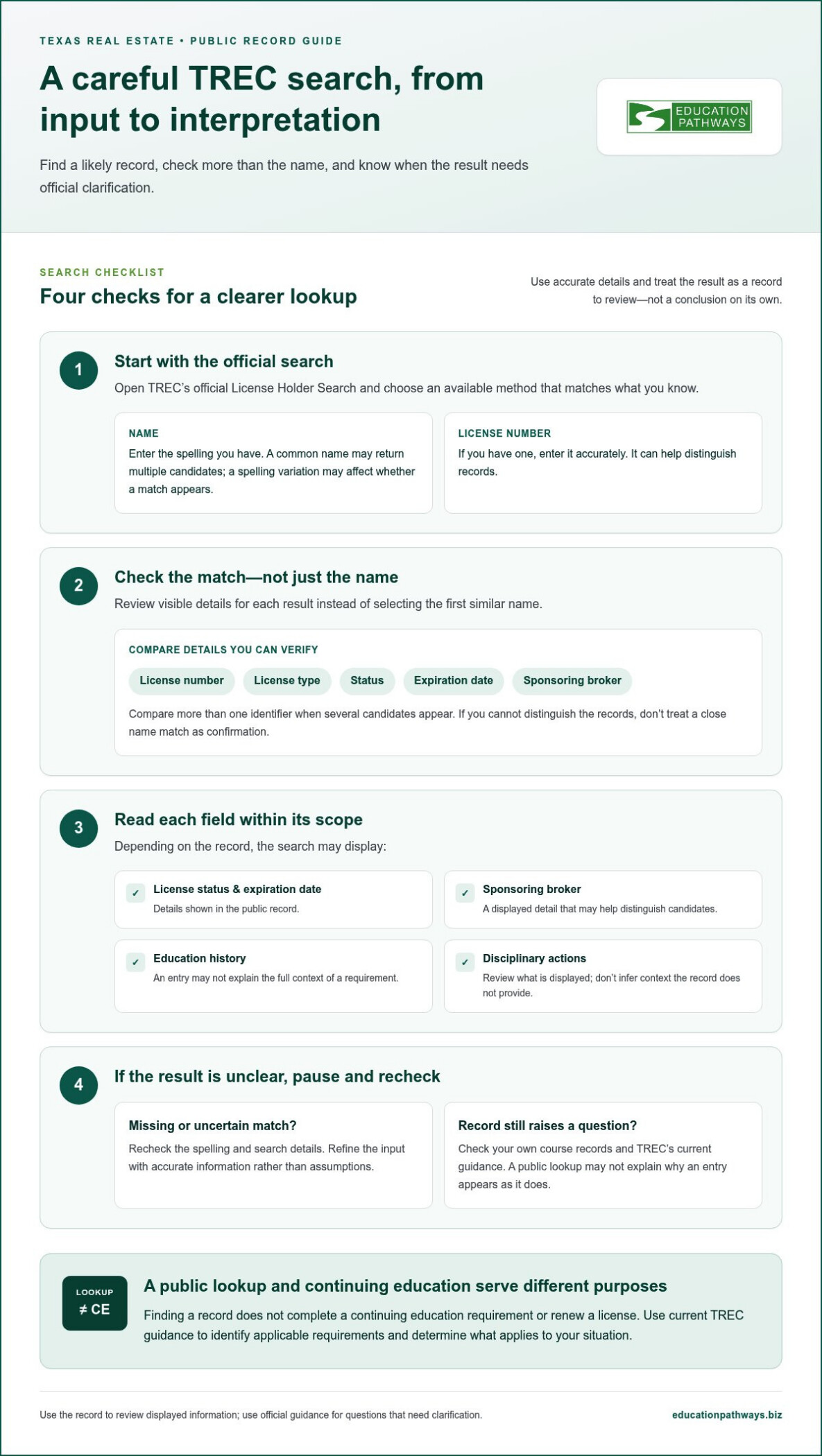
Use TREC’s official search to look up a license holder by name or license number. Then review the information displayed, which may include license status, expiration date, sponsoring broker, education history, and disciplinary actions. A public lookup and continuing education serve different purposes, so finding a record doesn’t complete a CE requirement.
If education details appear incomplete or information seems inconsistent, treat the record as a starting point rather than a full explanation. Check your own course records and use TREC’s current guidance to resolve questions about the official record or your requirements. If you identify a continuing education need, Texas real estate CE can be a practical next step. Here’s how to search, read the record, and decide what to do next.
Key Takeaways
- Use the official TREC license holder search and the most distinctive accurate details available to locate a record.
- Compare the result with information you already have, and distinguish displayed facts from questions that need official clarification.
- If a match is missing or unclear, recheck the spelling and search details before drawing conclusions.
- A public license lookup and continuing education serve different purposes; finding a record doesn’t satisfy CE requirements.
- Use current TREC guidance to identify applicable CE requirements and decide on the right next step.
What TREC License Holder Search Can, and Cannot, Tell You
Need to find a Texas real estate license record or check details for a professional? The TREC license holder search is a public lookup provided by the Texas Real Estate Commission, or TREC. It helps you locate and review information displayed in the commission’s records. It is a useful starting point, but it is not a complete review of a person’s compliance or circumstances.
TREC is the state regulator identified in the search results. For a broader background on its role, see the Texas Real Estate Commission (TREC) Wikipedia page. The search is designed to help users find license information. Depending on the record, results may show details such as status, expiration date, sponsoring broker, education history, or disciplinary actions. Each field has a specific scope. Don’t treat a displayed item as an answer to a question the record doesn’t address.
A public license lookup helps you find and review displayed license information; license renewal is a separate process for meeting applicable renewal requirements. Finding a record doesn’t renew a license, confirm that every requirement has been met, or replace guidance from TREC.
Who might use the TREC license holder search?
License holders may check their own public record to see what information appears. Clients, prospective clients, and other members of the public may use it to look up a real estate professional. The search interface may offer different license categories, so review the current options on TREC’s official search page instead of assuming every credential or professional type appears in the same way.
For example, a consumer with a professional’s name can search for a matching record and compare the displayed details with information they already have. A license holder can review the public record alongside their own renewal and course documentation. In either case, the result is a record to inspect, not a substitute for resolving a discrepancy through official channels.
What a public lookup does not establish
A search result is not legal or regulatory advice. Nor does one field necessarily provide the full context behind a license status, an education-history entry, or another detail. The lookup can help answer whether a matching public record is available and what it displays, but it may not explain why an entry appears as it does or settle a question about a specific situation.
If the result leaves an important question open, avoid drawing a firm conclusion from a partial or unclear entry. Check the current explanations and instructions on TREC’s official website. Use the search to locate and review displayed information, then refer to official guidance for questions that require interpretation or confirmation.
How to Search for a TREC License Holder Step by Step
Start with TREC’s official License Holder Search. The tool lets you look up a Texas real estate professional using the search options it provides, including a name or license number. Use the most distinctive accurate detail you have, then compare the results before deciding you’ve found the right record.
- Open the official tool. Go to the Official TREC License Holder Search, the commission’s public search page.
- Choose an available search method. Select the option that matches the information you know, such as the person’s name or license number. Follow the fields and instructions currently shown on the page.
- Enter the details carefully. Use the most specific accurate information available. A license number can help distinguish records. For a name search, enter the spelling you have and adjust it if needed.
- Review the matches. Check the visible details for each result instead of selecting the first similar name. If several candidates appear, compare more than one identifier before proceeding.
What information should you use to narrow a search?
Use the search fields currently available in TREC’s interface. The lookup supports searches by name or license number. If you have a license number, enter it accurately. If you’re searching by name, remember that a common name may return multiple candidates, while a spelling variation may affect whether a match appears.
Start with information you can verify, such as the spelling shown in business correspondence or a license number provided by the professional. If the results aren’t clear, refine the input rather than adding assumptions. If the page offers additional fields or filters, use only those shown in the live interface and enter accurate details.
How to confirm you have the right license holder
A name match is a starting point, not proof of identity. Compare the result’s name with what you already know, then check the license number and other displayed license details. Where available, details such as license type, status, expiration date, or sponsoring broker can help distinguish between candidates.
For example, if two results share a name, don’t choose based on the name alone. Check whether the license details align with the person you intended to find. If you don’t have enough information to distinguish the records, return to the search and try a more specific accurate detail. If the match remains uncertain, use TREC’s current guidance rather than treating a close resemblance as confirmation.
Keep the purpose of the lookup in view: it helps you locate and compare public records. It can’t resolve every identity or record question by itself. If your search also prompts you to review a continuing education need, check the applicable requirements and consider Texas real estate CE requirements as a separate next step.
How to Read TREC Search Results and License Status
A result gives you information to assess, not a conclusion about every aspect of a license. The TREC license holder search may display a status, expiration date, sponsoring broker, education history, or disciplinary actions. The current interface determines which fields appear, so check the live record rather than relying on an old screenshot or information copied elsewhere.
Separate what the page states from what you’re trying to determine. A displayed status or date is a record detail. Whether it resolves a particular licensing question may depend on context or current TREC rules. Read the field as written, note anything unclear, and use the Texas Real Estate Commission official website for current explanations before making a decision.
What do active, inactive, or expired labels mean?
Don’t assign a consequence to a status label based on the word alone. TREC’s terminology and explanations are the reference point, and a label by itself may not answer every question about a person’s licensing circumstances. If a result shows “active,” “inactive,” or “expired,” consult TREC’s current explanation for that exact label and record. If the meaning remains uncertain, seek clarification through TREC’s official channels.
Interpret a TREC status label using the commission’s current explanation, not the label alone. This keeps the result useful without turning a brief entry into an unsupported compliance determination.
Can the search show continuing education information?
The search may include education-history information, but the fields visible can change. Review the current record to see what it actually displays. An education entry is not the same as a course provider’s completion certificate: one is information shown in the public lookup, while the other is documentation issued by a provider after course completion.
If the record doesn’t show the education detail you expected, don’t assume from that alone that a course was or wasn’t completed. Check your course documentation and follow TREC’s current guidance to resolve a difference. The search result is one source of displayed information, not a substitute for your records or official direction.
Keep lookup and education requirements separate. A public license record doesn’t itself satisfy a continuing education obligation. Use current TREC guidance to identify the requirements that apply to your situation; Texas real estate CE requirements can help organize that separate review.
Handling Missing or Confusing TREC License Search Results
A blank result, several possible matches, or a detail that doesn’t line up can be unsettling. Treat the TREC license holder search as a starting point, then work through the issue methodically. A search may not return a match for several reasons, and an unclear entry alone doesn’t explain what happened.
Use this sequence before drawing a conclusion:
- Check the information you entered. Review spelling, spacing, and any other formatting. Compare your entry with the original source rather than relying on memory.
- Try another available search field. If TREC’s current interface provides another method, such as a license number instead of a name, use it with accurate information.
- Review each candidate carefully. If multiple people appear, compare the available license details and other visible information. Don’t treat a similar name as proof that you’ve found the intended person.
- Identify the exact discrepancy. Note which field seems inconsistent and what you expected to see. This makes it easier to consult TREC’s guidance or explain the issue through its current contact process.
If no result appears or several people match
First, recheck the spelling and search inputs. A name variation or entry mistake can affect what appears. If there’s still no match, try another search method if the tool offers one. An absent result doesn’t prove that someone has no license. For multiple matches, use more than the name to distinguish candidates; if you can’t identify the right record, pause rather than guessing.
If status or education details appear inconsistent
Compare the displayed information with TREC’s current explanations and instructions. If a status still doesn’t answer your question, use the commission’s current contact guidance. For an education-history discrepancy, keep relevant course completion documentation available while you investigate. Follow TREC’s current record-correction instructions if the issue appears to involve an official entry.
Keep the question narrow. For example, distinguish “I can’t find this record” from “the education history doesn’t show a course I completed.” Each points to a different issue, and clear notes help you avoid mixing an identity question with a record question. Don’t assume a displayed record is wrong just because it differs from your own documents, but don’t ignore a mismatch either. Use official guidance to determine the next step.
There’s no need to guess at a correction process or how long a record change might take. TREC’s current instructions are the appropriate source for those details. Once you’ve resolved the lookup issue, address any separate CE need through current TREC guidance. If you’ve identified a Texas real estate continuing education need, explore Texas real estate CE options.
After the Search: Connect License Lookup With Texas CE and Renewal
A license lookup and a renewal requirement are separate tasks. The TREC license holder search helps you find and review a public record. It doesn’t enroll you in a course, complete continuing education, or establish which requirements apply to your individual renewal. Use current TREC guidance to identify your next step.
If the lookup raises an education question, treat it as a prompt to review your records and requirements, not as a substitute for either. A search result may display education history, but it doesn’t complete a course or replace documentation from a course provider. Keep those purposes distinct as you plan.
When continuing education becomes the next step
Once you’ve identified a CE need, compare it with current TREC requirements for your license and renewal situation. Requirements can depend on the applicable context, so don’t assume that a result or a general course description settles what you personally need. For planning, review Texas real estate license renewal information alongside TREC’s current guidance.
Then match the education you’re considering to the requirement you’ve identified. A course completion certificate documents course completion; it isn’t the same as the public lookup record. Keep your records organized and use official guidance if you need to resolve a question about how education applies to your renewal.
Choose a practical online CE path
Education Pathways, LLC offers Texas real estate continuing education through self-paced, fully online courses. The courses include digital content and automated assessment, with instant certificates issued after completion and reported to the appropriate licensing board. These features support a flexible way to complete coursework, but they don’t determine which specific course meets an individual’s requirement. Check your applicable TREC requirements before selecting coursework.
When you’re ready to review available coursework, browse Texas real estate CE classes and compare the course information with the need you’ve identified. Keep your selection tied to current TREC guidance rather than relying on the search result alone.
The practical sequence is simple: use the public record to locate information, consult TREC to understand your obligations, then choose education that aligns with the requirement you’ve identified. A lookup can help you know what to investigate next, but renewal planning and course completion happen separately.
Explore online continuing education when you’re ready to review Texas real estate CE options.
Take Your Next Licensing Step With Confidence
Treat the result of a TREC license holder search as a useful reference point, then let your specific question guide what comes next. If you’re checking a record, use current TREC guidance to resolve anything that remains unclear. If you’re planning renewal, identify the CE requirements that apply to your situation before choosing coursework.
Education Pathways, LLC provides online continuing education for Texas real estate professionals. When you’ve identified a CE need, compare the available course information with the requirement you’ve confirmed. Your lookup and your education serve different purposes, but both can help you move forward with greater clarity.
Explore online continuing education and take the next step at your own pace.
Frequently Asked Questions
How do I search for a TREC license holder?
Use TREC’s online License Holder Search and enter the information you have about the professional. Before starting, gather the spelling of the name or the license number from a reliable source, such as business correspondence. That can help you avoid searching from memory. If you’re checking your own record, note the exact field or detail you want to review so you can focus on it in the result.
Is the TREC license holder search free and public?
Yes. TREC provides the search as a free public resource. Members of the public can use it to look up a real estate professional, and license holders can review their own displayed information. Because the record is publicly accessible, consider which details you’re using when discussing a search with someone else. For questions about the meaning or accuracy of an entry, rely on TREC’s current instructions.
Can I search for a Texas real estate license by name?
Yes. A name is one way to look for a Texas real estate license in the TREC search. If you’re unsure of the spelling, check it against a reliable document before searching. You can also use a license number if you have one. Keep any notes about the result tied to the person you intended to look up, especially if you’re reviewing records for multiple professionals.
What do active, inactive, and expired mean in a TREC search?
Use TREC’s current status explanations to understand the specific label shown. Avoid treating a label as a complete answer to a question about someone’s authority or circumstances. If you’re making a time-sensitive decision based on a status, consult TREC’s official guidance rather than relying on an informal interpretation. That’s the safest way to use the wording accurately.
Can I check my continuing education records through TREC license holder search?
You may be able to review education-history information if it appears in the current search record. For your own tracking, keep a separate file with course names, completion dates, and provider certificates. If you’re checking a particular class, having those details ready can make it easier to identify what you’re looking for and explain a discrepancy through the appropriate official channel.
What should I do if my TREC license search shows no results?
Check whether you have another accurate identifier to try, such as the license number, and review TREC’s current search instructions. If the lookup still returns nothing, use the commission’s contact guidance to ask about the record. Keep a note of the search method and information you entered. That gives you a clear starting point if you need to explain the issue.
How can I verify that I found the correct Texas license holder?
Compare the record with information you already have from a trusted source, such as the professional’s direct business materials. A license number can be especially useful if it’s available to you. If the public record includes brokerage or contact details, compare those as additional clues, not as standalone proof. When the details don’t establish a confident match, seek official guidance before relying on the result.
Does finding my license in TREC search renew my license?
No. A search is for viewing a record, not submitting a renewal. If you’re preparing to renew, use TREC’s current renewal instructions to identify the required actions and any deadlines that apply to your situation. Keep a personal checklist of the steps you complete and save related records. This helps keep your renewal planning organized without confusing a lookup with an application or course activity.