How to Find Completed NMLS Courses: Guide for MLOs

Your provider certificate is proof you finished your training, but it isn’t official proof of compliance. Many mortgage loan officers assume their education is set the moment they close their browser, only to face a frantic scramble as the December deadline looms. If you’re wondering how to find my completed NMLS courses to ensure your 2026 renewal is on track, you aren’t alone. The NMLS Resource Center often feels like a maze when you’re just looking for a simple confirmation.
We understand that your time is valuable and regulatory anxiety is real. You’ve done the hard work of completing your eight hours of CE, and now you need the peace of mind that comes with official verification. This guide provides a clear, step-by-step path to locate your official education records and verify that every credit has been reported correctly. We’ll show you how to access your Composite View, download an official transcript, and bridge the gap between provider certificates and NMLS records. You’ll finish this article ready to head into the 2026 season with total confidence and a clear roadmap for your professional requirements.
Key Takeaways
- Learn the exact steps to navigate the NMLS Resource Center and locate your official education records within the individual portal.
- Discover how to find my completed NMLS courses by accessing the Composite View, the definitive transcript for your CE and PE credits.
- Understand the distinction between provider-issued certificates and official NMLS records, including the standard reporting timelines.
- Identify common reasons for missing credits, such as BioSig-ID authentication errors, and how to resolve them quickly.
- Prepare for the 2026 renewal season by learning how to bundle your 8-hour CE requirements and set early completion goals.
Accessing Your Official NMLS Education Record
To confirm your compliance status, you must go directly to the source. The NMLS Resource Center is the only platform that tracks your official progress toward the 2026 renewal. If you’ve been searching for how to find my completed NMLS courses, the journey begins at the individual portal login. This is where your provider certificates are officially recorded as credits.
Logging into the NMLS Individual Portal
Accessing your account is the first hurdle. If it’s been a while since you logged in, use the “Forgot your User ID?” or “Forgot your Password?” links on the main page. You’ll need the email address associated with your account to recover these credentials. Before you click into your records, ensure your browser settings allow pop-ups. The transcript viewer often opens in a separate window; a strict ad-blocker or default browser setting can prevent it from appearing. Always verify that your personal information is current. If your name or contact details are incorrect, it could lead to reporting delays or issues with your 2026 license renewal.
Navigating the Education Tab
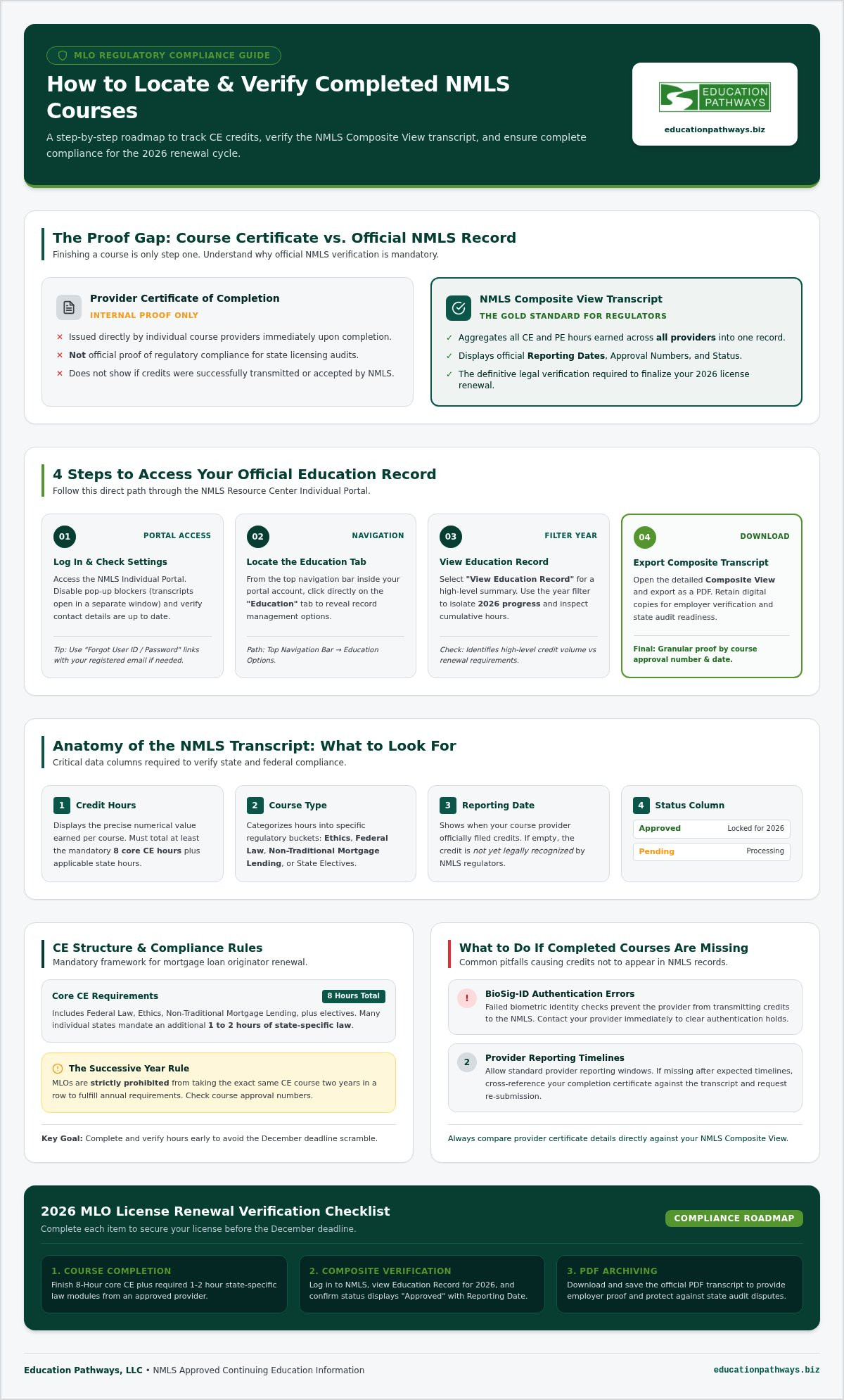
Once you are inside the portal, look at the top navigation bar. You’ll see a tab labeled “Education.” Clicking this reveals several options that are critical for your record keeping. For a quick snapshot, select “View Education Record.” This page provides a high-level summary of your total hours. It’s helpful for a fast check, but it often shows cumulative hours and may lack the granular detail needed for specific state audits. When you’re trying to figure out how to find my completed NMLS courses for a specific cycle, use the following steps:
- Locate the “Education” tab in the top navigation bar of the individual portal.
- Select “View Education Record” to see your high-level hour summary.
- Use the year filter to isolate your 2026 progress specifically.
- Identify the status of your current renewal cycle requirements.
It is vital to understand that this view shows you’ve hit your hours, but it doesn’t always list the course provider or the exact date the NMLS accepted the credit. This high-level view is your first line of defense against missing deadlines, but it’s only the start of the verification process. For deeper insights into your compliance, you’ll need to look at the official transcript, which breaks down every hour by course type and approval number.
Understanding the NMLS Composite View and Transcript
The Composite View is your definitive record of compliance. While provider portals show what you finished in their specific system, the NMLS Composite View aggregates every hour earned across all providers into one official document. It’s the gold standard for regulators. If you’re still searching for how to find my completed NMLS courses, this transcript is the final answer. It provides a comprehensive look at your professional standing and ensures you’re meeting the mortgage loan originator licensing requirements set by federal and state authorities.
Reading the transcript requires attention to detail. The “Credit Hours” column shows the numerical value of the course, while the “Course Type” column categorizes those hours into specific buckets like Ethics, Federal Law, or Non-Traditional Mortgage Lending. You must also monitor the “Reporting Date.” This field tells you exactly when your provider filed your credits with the NMLS. If you’ve finished a course but don’t see a reporting date, the credits aren’t yet official in the eyes of the regulator.
How to Read Your NMLS Transcript
Focus on the “Status” column first. An “Approved” status means the credits are locked in for your 2026 renewal. If you see “Pending,” the system is still processing the data. It’s also important to distinguish between federal elective hours and state-specific hours, as many states require one or two hours of local law in addition to the core eight. For 2026 compliance, the Successive Year rule prohibits an MLO from taking the same CE course two years in a row to satisfy their credit requirements.
Downloading Proof for Your Records
Don’t just view your credits online; download them. Exporting your Composite View as a PDF is a critical step for employer verification and personal record-keeping. Having a digital copy allows you to quickly resolve disputes if a state agency questions your status during the renewal window. Always compare your NMLS transcript against the certificates issued by your provider. If the NMLS record is missing hours that your certificate proves you earned, you’ll need to contact the provider immediately to fix the reporting error. Using a provider that offers NMLS Approved MLO Continuing Education with automated reporting can significantly reduce these manual verification headaches.
Checking Course Provider Portals for Instant Proof
While the NMLS Composite View serves as the final authority, your course provider’s dashboard is the fastest way to confirm you’ve met your requirements. If you’re stressed about how to find my completed NMLS courses before they appear on your official transcript, the provider portal is your immediate resource. It serves as a vital bridge during the reporting lag, offering instant peace of mind while the NMLS processes your data.
To access your records, follow these standard steps within your education account:
- Log in to your NMLS Approved MLO Continuing Education portal using your secure credentials.
- Access the “My Courses” or “Completed” section of the user dashboard.
- Download the individual Certificate of Completion for each module you’ve finished.
- Verify that your NMLS ID was entered correctly in your provider profile to prevent reporting failures.
A simple typo in your NMLS ID is the most common reason for credits failing to transfer from a provider to the federal system. Checking this early ensures your 2026 renewal proceeds without a hitch.
Locating Your Certificates at Education Pathways, LLC
At Education Pathways, LLC, we prioritize efficiency. Our dashboard is designed for busy professionals who need information fast. You can access and re-download certificates from 2026 or previous years with just a few clicks. Every certificate we issue clearly displays the course name and approval number. You should always ensure the certificate name matches the NMLS approved list exactly. Since we’ve been operating since 2002, our system is built to provide the reliability you need during the high-pressure renewal season.
Why Certificates Matter Before NMLS Reporting
Certificates are more than just a pat on the back. They are essential for internal compliance audits at your brokerage or lending institution. While you wait for the standard 7 to 10 day reporting window to close, your certificate acts as temporary proof of your effort. When you’re looking into how to find my completed NMLS courses, your certificate provides the NMLS Course ID number. This number is your “receipt” for the education you purchased. If a discrepancy arises later, this ID number is what regulators will use to track down your missing credits. Keeping a digital folder of these documents is a best practice for every organized mortgage professional.
What to Do If Your Completed Courses Are Missing
Discovering a gap in your official record can be stressful, especially as the 2026 renewal deadline approaches. If you’ve followed the steps on how to find my completed NMLS courses only to see a blank transcript, the issue is likely a technical or administrative delay. Most providers operate within a standard 7 to 10 day window for reporting credits. This reporting lag is the most common reason for missing hours immediately after course completion.
Technical hurdles like BioSig-ID or authentication errors often stall the process. If your identity verification didn’t finalize correctly, the system might not recognize the course as finished. Additionally, the NMLS charges a reporting fee, typically $1.50 per credit hour, which your provider must process before the credits appear. If this banking fee isn’t settled or if there was a payment failure, your records will remain incomplete in the NMLS individual portal.
Common Reasons for Reporting Delays
Before escalating the issue, check for these frequent administrative roadblocks that can stop your credits from posting:
- Incorrect NMLS ID: Double check your provider profile for typos in your unique identifier. Even one wrong digit prevents the data from syncing.
- Administrative Holds: Ensure there are no pending payments or unfinished survey requirements on the provider side.
- System Maintenance: The NMLS Resource Center occasionally undergoes maintenance that can delay automated data transfers between systems.
Escalation Steps for Missing Credits
If more than ten days have passed and your hours aren’t visible, it’s time to take action. Start by contacting your education provider rather than the NMLS. The NMLS call center cannot locate credits that haven’t been uploaded by the provider yet. Ask the provider to verify the reporting status of your SAFE Act continuing education online credits. If a deadline is just days away, you may need to request a manual reporting upload to bypass automated batch schedules.
In cases where a course is rejected due to the Successive Year rule, you’ll need to enroll in a different course with a unique NMLS approval number. The system won’t accept the same course ID two years in a row for 2026 compliance. For a seamless experience and guaranteed automated reporting, choose Education Pathways for your MLO continuing education. We handle the heavy lifting of reporting so you can focus on your business without the anxiety of missing credits.
Organizing Your MLO Continuing Education for 2026
Organization is the key to a stress-free renewal. Waiting until the final weeks of December often leads to the “Renewal Crunch,” where system outages and reporting delays can put your license at risk. By setting a completion goal for November, you ensure that any technical issues or missing credits can be resolved well before the deadline. While you’ve already learned how to find my completed NMLS courses to verify your current standing, applying that same diligence to your future schedule is equally important for long-term career stability.
Bundling your 8-hour CE requirements is the most efficient way to handle your education. It typically offers better pricing and, more importantly, it streamlines the reporting process. When you take all your hours through a single provider, you only have one dashboard to monitor and one set of certificates to manage. Don’t forget to verify your state-specific requirements alongside your federal hours. Many MLOs focus solely on the core federal modules and overlook the unique mandates of their specific licensing states, which can stall the entire renewal process.
The 2026 Renewal Checklist
Success starts with knowing exactly what you need. Use this checklist to stay on track for the upcoming season:
- Confirm you have the required 3 hours of Federal Law and 2 hours of Ethics.
- Check the NMLS Resource Center for any new or updated state-mandated hours for 2026.
- Schedule your NMLS 8 hour CE course before the holiday season begins.
- Verify that your chosen course IDs are different from the ones you took in 2025 to satisfy the Successive Year rule.
Streamlining Compliance with Education Pathways
Choosing the right provider makes the difference between a simple task and a regulatory headache. Education Pathways offers 100% online, self-paced modules designed specifically for busy professionals. You don’t have to worry about how to find my completed NMLS courses when our system handles the heavy lifting for you. We’ve been a trusted partner in professional education since 2002, providing the reliability you need to maintain your license with confidence. Our automated reporting system sends your credits directly to the NMLS upon completion, giving you instant peace of mind and one less thing to track. You can focus on your clients while we ensure your compliance records are accurate and up to date for the 2026 season.
Secure Your 2026 Compliance with Confidence
Maintaining your mortgage license shouldn’t be a source of stress. By mastering the NMLS Resource Center and understanding how to find my completed NMLS courses, you’ve taken a major step toward a seamless 2026 renewal. Always remember that your official transcript is the final word on compliance, while your provider certificates serve as your immediate receipt of hard work.
The key to a smooth career is staying ahead of the deadlines. Don’t let reporting lags or technical errors catch you off guard in December. Instead, choose a partner that values your time and simplifies the regulatory process. As an NMLS Approved Provider, Education Pathways offers 100% online, self-paced courses that fit your busy schedule. We include automated reporting to the NMLS and provide instant certificates of completion to give you immediate peace of mind.
Complete your 2026 NMLS CE with Education Pathways today and move forward with total professional certainty.
Frequently Asked Questions
How long does it take for a course to show up on my NMLS transcript?
It typically takes 7 to 10 days for credits to appear on your official transcript after finishing a module. Education Pathways streamlines this by reporting credits directly to the NMLS as soon as you complete your course. If you are checking how to find my completed NMLS courses and don’t see them yet, allow for this standard processing window before contacting your education provider for an update.
Can I see my NMLS course history from previous years?
Yes, you can view your entire continuing education history within the NMLS individual portal. By navigating to the Education tab and selecting the Composite View, you can filter your records by specific years. This allows you to verify compliance for the 2026 season while reviewing credits earned in previous cycles. Keeping a digital copy of these records annually ensures you have a permanent backup for your professional files.
What is the NMLS Composite View and how do I access it?
The NMLS Composite View is the official, definitive transcript that aggregates all your PE and CE credits into one document. You access it by logging into the NMLS Resource Center, clicking the “Education” tab, and selecting “Composite View” from the dropdown menu. This view is essential for mortgage loan officers because it shows exactly what regulators see when they verify your licensing status and 2026 renewal eligibility.
Why is my completed course showing as “Pending” in NMLS?
A “Pending” status usually means the NMLS system has received the data but hasn’t finalized the credit posting. This often occurs during high-volume periods or if there’s a delay in processing the required banking fees. If your status doesn’t change to “Approved” within a few business days, check your provider dashboard. You can confirm how to find my completed NMLS courses there to ensure your ID was submitted correctly for reporting.
Do I need to upload my certificates to NMLS myself?
No, you don’t need to upload certificates yourself; NMLS approved providers are responsible for reporting your credits. Once you finish a course at Education Pathways, our system handles the automated reporting to the licensing board for you. While you should download your instant certificate of completion for your personal records, the official credit entry must be completed by the provider through the NMLS banking system.
What happens if I accidentally take the same NMLS course twice?
If you take the exact same course ID two years in a row, the NMLS will reject the second attempt due to the Successive Year rule. This means those hours won’t count toward your 2026 renewal requirements. To avoid this, always verify the NMLS course approval number on your transcript before enrolling in a new module. Choosing a provider with a diverse catalog ensures you meet your legal obligations without repetition.
Where can I find my NMLS ID if I forgot it?
You can find your unique NMLS ID by searching your name on the NMLS Consumer Access website. This public database provides your ID number without requiring a login. Alternatively, your ID is prominently displayed on the main dashboard of your individual portal once you log in. Having this number ready is vital for course enrollment and ensures your credits are accurately reported to your official record for the 2026 season.
How do I know if I have met all my state-specific CE requirements?
You can verify your state-specific status by reviewing the “State Requirements” section within your NMLS Composite View. This area breaks down exactly which hours are required for each state where you hold a license. Since many states mandate specific law or elective hours in addition to the federal eight, checking this early helps you avoid a last-minute scramble. Education Pathways offers specific bundles to help you meet these unique 2026 mandates efficiently.